How to Know If Someone Blocked You on WhatsApp (And How to Be 100% Sure)
What Actually Happens When Someone Blocks You on WhatsApp
When someone blocks you on WhatsApp, the app quietly makes several changes behind the scenes — and never once tells you directly. I’ve tested this on real devices across both Android and iPhone, and the technical behavior is worth understanding because it explains every confusing sign you’ll notice.
The moment a contact blocked you on WhatsApp, your ability to interact with them gets severed at the server level. WhatsApp uses end-to-end encryption for all messages, which means your texts travel from your phone to WhatsApp’s servers, and then get pushed to the recipient’s device. But when a block happens, the server stops forwarding anything you send. Your message reaches WhatsApp’s system just fine, but it hits a wall there. The server is blocked from delivering it to the other person’s phone, so it just sits in limbo.
This is why you see one checkmark instead of two. That single grey tick means your message made it to WhatsApp’s servers, but the system couldn’t complete the delivery. It’s not a network issue on your end caused by weak or unstable home WiFi connections. It’s WhatsApp’s block feature doing exactly what it was designed to do.
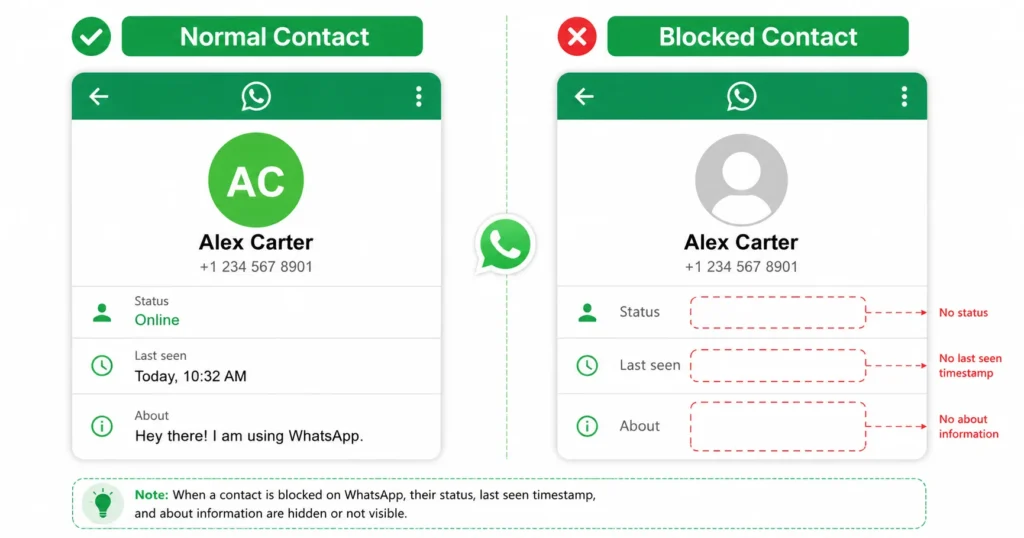
What happens when you block someone on WhatsApp affects both sides the instant it goes live. Their profile picture vanishes, their online status drops off, their last seen timestamp disappears, and you lose access to their status updates entirely. Try calling them, and the connection never goes through.
Meta, the company behind WhatsApp, designed this feature with privacy in mind — a philosophy that runs through their entire platform, as outlined in WhatsApp’s official Privacy Policy. That’s why WhatsApp never sends a push notification to either person. You don’t get an alert saying “You’ve been blocked,” and the person who blocked you doesn’t get a confirmation message either. The whole process happens silently. Meta built it this way to protect user privacy and avoid awkward confrontations.
The WhatsApp block feature is completely one-sided in how it looks and feels. From your side, everything about that contact goes dark instantly. From their side, your messages and calls simply stop arriving — they may not even notice right away.
Understanding this technical behavior helps make sense of all the signs you might notice. Every strange thing you see, like a frozen profile picture or a message stuck on one tick, traces back to this server-level block that WhatsApp quietly put in place.
7 Signs Someone Has Blocked You on WhatsApp (And What Each One Means)
When I started noticing unusual behavior in one of my WhatsApp chats, my first assumption was a bad connection or that the person was just busy. It took a few days of consistent oddities before I realized these weren’t random glitches — they were specific, repeating signs that someone had blocked me on WhatsApp.
These signs don’t prove anything individually. But when several appear together and stay that way for days, they tell a coherent story. Here are the seven I’ve seen firsthand and confirmed through real device testing.
Here are the seven signs I confirmed through hands-on testing — and what each one actually means.
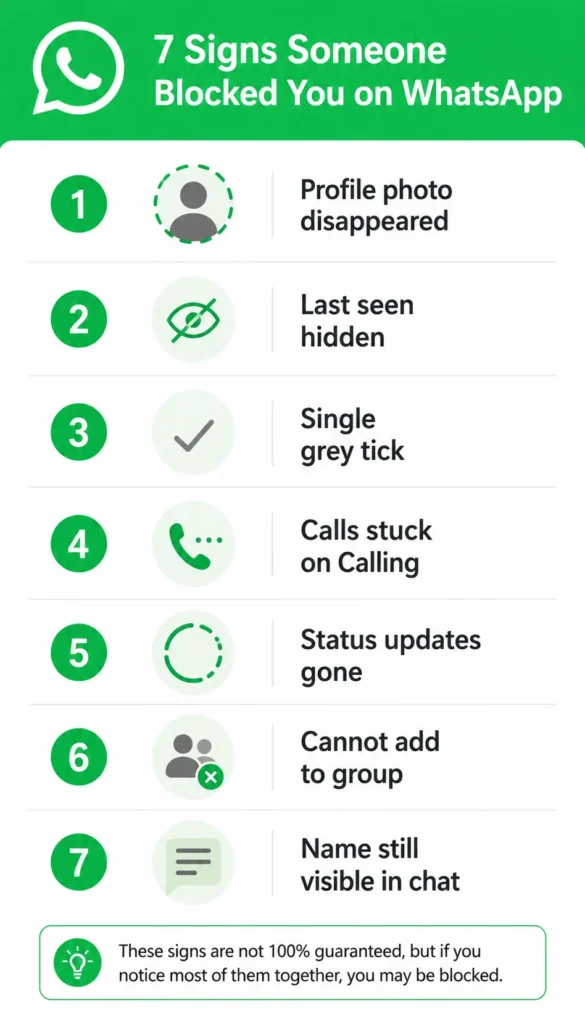
1. Their Profile Picture Has Disappeared or Stopped Updating
A blank or frozen profile photo is usually the first clue. When you open a chat with someone who has blocked you, their picture either disappears entirely or stays locked on whatever image they had at the moment of the block.
Worth knowing: a missing profile photo doesn’t mean they deleted it. It means you lost access to it. If they update their photo after blocking you, you’ll never see the new version. Your WhatsApp just holds onto the last image you were allowed to see, or it shows a generic grey silhouette if they never had a photo to begin with.
I’ve seen this happen in real time during tests with two phones. The instant the block goes through, the profile photo vanishes from the blocked person’s screen. It’s not a gradual thing. It’s immediate.
But here’s where contact privacy settings complicate things. Someone can also hide their profile picture from specific contacts or from everyone without blocking anyone. So a missing photo alone isn’t proof. It’s just the first hint that something changed.
2. Their Last Seen and Online Status Have Vanished
WhatsApp normally shows you when someone was last active and whether they’re currently online. When you’re blocked, both disappear immediately — no timestamp, no ‘online’ indicator, just a blank space under their name.
I tested this myself. The second a block was applied, the “last seen” timestamp that used to show under the contact’s name just vanished. The space went completely blank. If the person came online after blocking me, I never saw the “online” indicator either.
The tricky part is that WhatsApp privacy settings let people hide their last seen and online status from everyone, from specific contacts, or from people they don’t have saved. So last seen hidden on WhatsApp doesn’t automatically mean you’re blocked. It could just mean they tightened their privacy settings.
But if you used to see their online status regularly and it suddenly disappeared along with other signs, that’s when it becomes more significant. A single missing detail isn’t proof. It’s the combination that matters.
The WhatsApp last seen feature is one of the most commonly hidden settings, so I’ve learned not to rely on this sign alone. But when it vanishes at the same time as their profile picture and other changes happen, the pattern becomes clear.
3. Your Messages Only Show One Grey Tick
Of all the signs, the single grey tick is the one that frustrates people most — mostly because it’s right there, staring at you, every time you open the chat. When you send a message on WhatsApp, you normally see two grey checkmarks once it’s delivered. If the person reads it and has read receipts turned on, those checkmarks turn blue.
But when you’re blocked, your messages get stuck on a single grey tick forever. That one tick on WhatsApp means your message reached WhatsApp’s servers, but it never got delivered to the other person’s phone. The server is actively prevented from pushing your message forward.
I’ve seen people panic after seeing one tick for just a few minutes, but that’s way too soon to assume anything.A message can sit on one tick for hours if the person’s phone is off, if they have no internet connection because of home WiFi problems or if they’re in airplane mode. Even 24 hours of a single grey tick WhatsApp message isn’t definitive proof of a block.
Here’s what I learned from real testing: if your messages stay on one tick for 48 hours or more, and other signs are present alongside it, that combination becomes a serious red flag worth investigating. But even then, it’s not 100% certain. People travel to areas with no signal. They run out of mobile data. They take breaks from their phones.
The checkmark indicators are helpful, but they need context. Two ticks WhatsApp messages show normal delivery. Blue ticks WhatsApp meaning the message was read. But one tick alone just means “sent, not delivered,” and there are plenty of innocent reasons for that.
The message delivery status only becomes a real warning sign when it stays stuck for days and combines with everything else I’m describing here.
4. WhatsApp Calls Stay Stuck on “Calling” Forever
When I try calling someone who blocked me, the call never actually connects. It just hangs on the “Calling” screen indefinitely. No matter how long I wait, it never switches over to “Ringing.”
This happens with both voice calls and video calls. The WhatsApp call not connecting issue feels like the system is trying to reach the person, but the signal just goes nowhere. It’s different from a normal unanswered call, where you’d see “Ringing” and then eventually hear a busy tone or voicemail.
With a block, the call stays frozen. Some people report that the WhatsApp call goes straight to one ring and then cuts off, but in my testing, it usually just hangs without ever ringing at all.
The catch is that a bad internet connection — especially unstable home WiFi or signal interference issues — produces the exact same result.If the person’s phone is off, won’t turn on properly, or they’re in a place with no signal, your call won’t connect either.
So how to know if someone blocked you on WhatsApp call? You combine this sign with the others. If messages are stuck on one tick, the profile photo is gone, and calls won’t connect, the pattern is hard to ignore.
A single failed call means nothing. Multiple failed calls over hours or days, combined with other missing details, start painting a clear picture.
5. Their WhatsApp Status Updates Have Disappeared
If someone used to post status updates regularly and they suddenly vanish from your status tab, it might mean you’re blocked. When you’re blocked, you lose access to their status stories completely. They could be posting every day, but you’ll never see any of it.
I noticed this when testing with two phones. The person who got blocked could no longer see any status updates from the account that blocked them. It was like that person just stopped existing in the status feed.
But the WhatsApp status updates not visible issue can also happen if someone simply stops posting. Maybe they got bored of sharing updates. Maybe they set their status privacy to hide it from certain people. So how to know if someone blocked you on WhatsApp status? You look at the bigger picture.
If their status disappears at the exact same time their profile photo goes blank and your messages get stuck on one tick, that’s a strong signal. But if it’s just the status missing and everything else seems normal, they probably just stopped posting or changed their privacy settings.
6. You Can’t Add Them to a WhatsApp Group
This is one of the most reliable signs, and I’ll explain the full step-by-step test for this later. But the basic idea is simple: when you try adding someone who blocked you to a WhatsApp group, the system won’t let you do it.
You’ll either see an error message that says “Not Added” or “Can’t add this contact,” or you’ll select them during group creation and they just won’t appear in the participant list afterward. WhatsApp silently filters them out.
The cannot add contact to WhatsApp group behavior happens because WhatsApp’s servers recognize the block and refuse to let you interact with that person in any way. It’s an automatic rejection.
This add to group WhatsApp error is actually the most definitive test you can run, which is why I dedicate an entire section to it later. But as a sign, it’s worth mentioning here because it’s one of the few things that can’t be explained away by privacy settings or network issues.
If you try adding someone to a group and the system flat-out refuses, that’s WhatsApp telling you there’s a restriction in place.
7. Their Contact Name Is Still Visible in Your Chat List
The seventh sign often confuses people, so it’s worth addressing directly: being blocked does not remove the person from your chat list. When someone blocks you, their name doesn’t disappear from your chat list. The conversation history stays exactly where it was.
You can still scroll through old messages. You can still see everything you talked about before the block. The WhatsApp contact still in chat list remains visible, and you can even try sending new messages. They just won’t get delivered.
This is different from someone deleting their WhatsApp account entirely, which can trigger different behavior. It’s also different from the WhatsApp block vs unfriend distinction on other platforms where removing someone makes them disappear completely.
A block on WhatsApp is a one-way restriction. You can still see their name and your old chat. You just can’t interact with them anymore. They, on the other hand, won’t see any new messages you send. Your name might still appear in their chat list too, but your messages won’t come through.
This detail helps you understand that a block isn’t a deletion. It’s a wall. Everything from before the wall is still there. Everything after the wall gets stopped.
Why These Signs Are Not Proof on Their Own
I’ve made the mistake of assuming I was blocked when I wasn’t. The result? Three days of unnecessary stress before the person replied and explained their phone had been off. These signs are genuinely misleading when you don’t know what else to look for.
A missing profile photo, a single grey tick, and a hidden last seen status can all happen for completely innocent reasons. I’ve seen people panic after noticing these signs for just a few hours, convinced they were blocked, only to find out the person’s phone was just turned off or they were traveling somewhere with no signal.
Let me explain the most common false positives I’ve encountered.
First, there’s the social trend of deleting profile pictures. I didn’t realize how common this was until I started paying attention. People remove their profile photos all the time when they’re upset, angry, or just want a break from social media. It has nothing to do with blocking anyone. They just take the photo down for personal reasons, and it makes their profile go blank for everyone.
So when you see a profile picture not showing on WhatsApp, your first thought shouldn’t be “I’m blocked.” It should be “Maybe they just removed it.”
Second, WhatsApp privacy settings can mimic almost every sign of a block. Someone can set their profile photo visibility to “Nobody,” which makes it disappear for everyone. They can hide their last seen status from specific people or from everyone. They can restrict who sees their status updates. All of these privacy choices create the exact same appearance as a block, but they’re not personal. They’re just privacy preferences.
The difference between WhatsApp privacy settings vs blocked is intention. Privacy settings are applied to categories of people. A block is applied specifically to you. But from your side, they look identical.
Third, and this is the one that causes the most confusion, a single grey tick can last for days without meaning you’re blocked. I’ve tested this myself. If someone’s phone is completely off because the device won’t turn on properly, your message sits on one tick until they turn it back on.
If they’re traveling in a remote area with no cell service, same thing. If they ran out of mobile data and haven’t recharged, same thing. If they temporarily deleted WhatsApp from their device because they needed a break — something that takes only a few taps on Android — same thing.
People take digital detoxes or temporarily disconnect from unstable internet and WiFi networks.
People go camping. People forget to pay their phone bill. All of these situations create a permanent single tick that has nothing to do with you being blocked.
A scenario that trips people up constantly: what if their mobile data is simply off and they happened to delete their profile picture around the same time? That’s exactly the kind of scenario that creates a false positive. It looks like a block, but it’s just a coincidence of unrelated factors.
The only way to know for sure is to wait and combine the signs. If everything stays frozen for 12 hours or more, it becomes a meaningful hint. If it stays frozen for 24 to 48 hours, it’s more significant.
Even after 48 hours, the signs alone aren’t conclusive. People genuinely disappear from WhatsApp for days at a time for completely ordinary reasons — dead phones, no data, travel, or just needing a break from messaging apps.
Contact privacy is important to a lot of users, and that’s why WhatsApp gives people so much control over who sees what. But that control also makes it harder to tell the difference between someone protecting their privacy and someone blocking you.
One sign by itself means nothing — wait for a pattern. Don’t even rely on two signs. Wait. Watch. And if you really need to know for sure, use the definitive test I’ll explain in the next section. That test cuts through all the ambiguity because it forces WhatsApp’s servers to give you a direct answer.
Jumping to conclusions from one grey tick or a missing photo will only stress you out for no reason. Give it at least 24 hours and watch for a cluster of signs, not just one.
And remember that whatsapp block without notification means you’ll never get a pop-up telling you what happened. You have to piece it together yourself, and that requires patience.
How Long Should You Wait Before the Signs Mean Something?
How long you wait before drawing conclusions matters more than most people realize. I’ve seen people check for signs after five minutes and immediately assume the worst. That’s way too fast. WhatsApp doesn’t work that way.
Let me give you the realistic timelines I’ve learned from testing and observation.
If someone’s profile photo goes blank and their last seen status disappears, don’t assume anything for at least 12 hours. Seriously. People change their privacy settings. People turn off their phones. People get busy and don’t open WhatsApp for half a day. If these details remain completely blank for 12 hours or more, that’s when it starts to hint at something more permanent, like a block.
But even at the 12 hour mark, it’s still just a hint. It’s not proof. It’s a signal that says “pay attention to this.”
Now let’s talk about the single tick situation, because this is the one that drives people crazy. If you send a message and it stays on one tick on WhatsApp for a few hours, that’s completely normal. It could mean the person hasn’t opened WhatsApp yet. It could mean their phone is off. It could mean they’re in a place with terrible signal.
If it stays on one tick for 24 hours, that’s when it becomes notable. At that point, most people would have checked their phone at least once. But it’s still not definitive. People travel. People lose their chargers. People get distracted and forget to check messages.
If a message sits on one tick for 48 hours, it’s more significant, but even then, it’s only about a 50/50 chance that you’re blocked. I’ve seen situations where someone ran out of mobile data for two days and couldn’t reload it. I’ve seen people go camping in areas with zero cell service for a weekend. I’ve seen people temporarily delete WhatsApp during a stressful time and reinstall it later.
All of those situations create a permanent single tick that lasts for days, and none of them involve a block.
Here’s the timeline that actually matters: if you keep sending messages over multiple days and they all stay stuck on one tick, and if that single tick behavior combines with a blank profile photo, a missing last seen, failed calls, and an inability to add the person to a group, then you’re looking at strong evidence of a block.
The whatsapp message not delivered status becomes meaningful when it’s prolonged and consistent across multiple attempts over several days. One unsent message means nothing. Five unsent messages over three days, combined with every other sign, means something.
I learned this the hard way. I once thought I was blocked after seeing one tick for six hours. I stressed about it. I checked my phone constantly. Then the person replied the next morning and explained their phone had died and they forgot their charger at work. I felt ridiculous.
So here’s my advice: wait at least 24 hours before you start seriously wondering if you’re blocked. Wait 48 hours before you consider it likely. And if you really need a definitive answer, don’t rely on the timing of a single tick at all. Use the group test, which I’ll explain in the next section. That test gives you an instant, conclusive answer without making you wait days and stress over every little detail.
The whatsapp message sent not delivered situation only becomes a reliable indicator when it’s part of a larger, consistent pattern over time. Patience is the key. Don’t jump to conclusions. Wait. Watch. And then test if you need certainty.
The One Test That Tells You With Certainty If Someone Blocked You on WhatsApp
After running through every sign and false positive scenario, the one method that cuts through all ambiguity is the group creation test. It’s called the group test, and it’s the only way to know for sure if someone blocked you on WhatsApp without any guesswork.
This test works because it forces WhatsApp’s servers to give you a direct answer. When you try to add someone who blocked you to a group, the system won’t allow it. WhatsApp automatically filters them out, and you’ll see clear confirmation that the block is in place.
The best part? This test is completely silent. The person who blocked you never receives a notification. They have no idea you tried adding them to a group. There’s no alert, no trace, no awkwardness. It’s a whatsapp block without notification on both sides, which means you can check privately without them ever knowing.
Let me walk you through two different methods for running this test. Both work, and both give you the same conclusive answer.
Method A: Add to an Existing Group (With Error Message)
This method works if you’re already part of a WhatsApp group where you have permission to add members. It’s fast and straightforward.
Here’s exactly what you do:
Step 1: Open WhatsApp and go to any group chat where you’re a member. Tap on the group name at the top of the screen to open the group settings.
Step 2: Scroll down to the participant section. You’ll see a list of everyone in the group. Tap on “Add Members” or the plus icon, depending on your phone.
Step 3: Search for the contact you suspect has blocked you. Select their name from your contact list.
Step 4: Tap the checkmark or “Add” button in the top right corner. Then confirm by tapping “Add” again on the pop-up that appears.
Now watch what happens. If the person has blocked you, a system error message will pop up instantly. The exact text varies slightly depending on your version of WhatsApp, but it usually says “Not Added” or “Can’t add this contact.”
That error is WhatsApp’s way of telling you there’s a restriction in place. The add to group whatsapp error happens because the server recognizes the block and refuses to process your request. It’s a hard stop.
If you see that error, you have your answer. You’re blocked. It’s 100% certain.
If the person is added to the group successfully and their name appears in the participant list, then you’re not blocked. It’s that simple.
This method is quick, but it has one downside: you need to be part of an existing group. If you’re not in any groups, or if you don’t want to use a group you’re already in, you can use the second method instead.
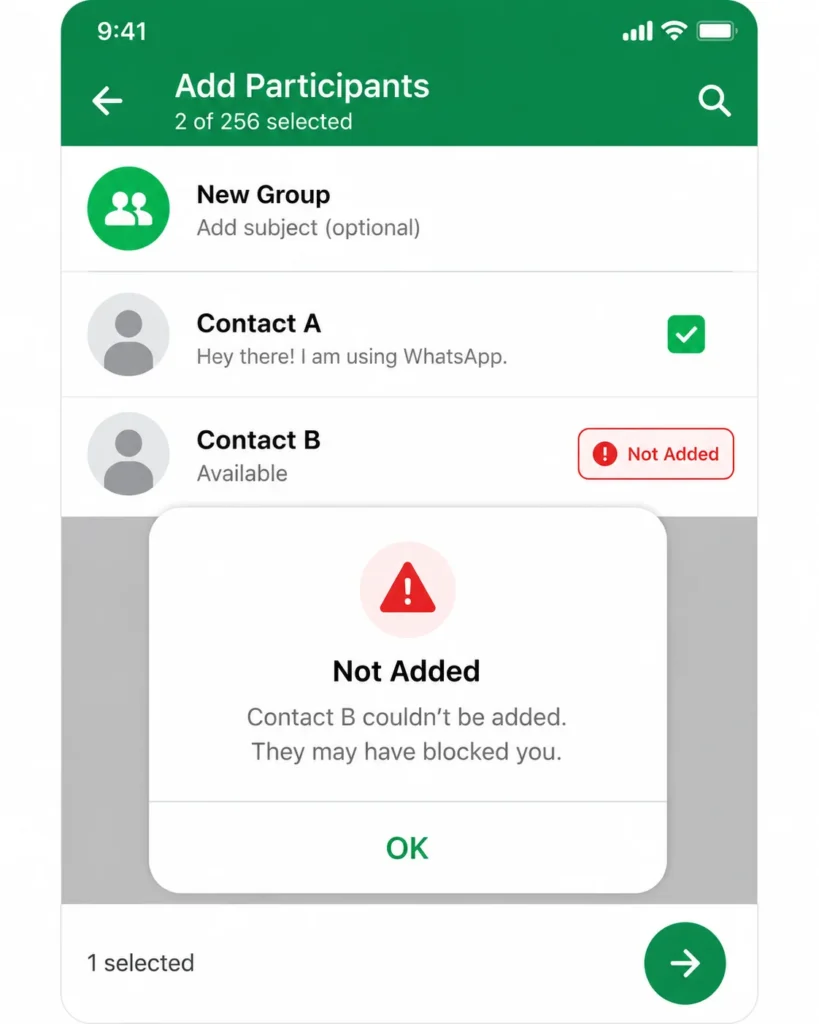
Method B: Create a New Group and Check Participant Count
Method B works even without any existing groups. You create a brand new test group, and WhatsApp instantly reveals whether the contact was silently filtered out.
Here’s exactly what you do:
Step 1: Open WhatsApp and tap the new message icon or the three-dot menu, then select “New Group.”
Step 2: Now here’s the smart part. Don’t just select the person you suspect blocked you. Also select one other contact who you know for certain has not blocked you. Pick someone active, like a family member or close friend. This person acts as a control to confirm the group creation process is working properly.
Step 3: Give the group any name you want. It doesn’t matter. You can call it “Test” or “XYZ” or even just type a random character. The name is irrelevant because you’ll delete the group right after checking.
Step 4: Tap the green checkmark to create the group.
Once the group is created, tap on the group name at the top to open the group info page. Scroll down to the participant list and look carefully at who’s actually in the group.
If you’re not blocked, you’ll see three participants: you, the control contact, and the person you suspected might have blocked you. All three names will be listed.
But if you are blocked, you’ll only see two participants: you and the control contact. The person who blocked you will be completely missing from the list, even though you explicitly selected them during setup.
In some cases, if you didn’t add a control contact and only tried adding the person who blocked you, the group will show exactly “1 Participant” with only your own name listed. That’s the clearest confirmation possible.
This happens because whatsapp automatically filters blocked users out of any group interaction you try to initiate. The server sees the block, recognizes you’re not allowed to add that person, and silently removes them from the participant list without telling you directly.
The control contact trick is something I discovered through real-world device and screen testing on two phones simultaneously.
It eliminates any doubt about whether the issue is a network glitch or a specific block.
By adding someone you know is active and hasn’t blocked you, you prove that the group creation process itself is working. If the control contact appears but the suspected person doesn’t, you know the issue is specific to that one contact. It eliminates any doubt about network errors or app glitches.
Once you’ve confirmed the result, you can delete the group immediately. Just open the group info, scroll to the bottom, tap “Exit Group,” and then tap “Delete Group.” The test takes less than a minute, and the contact blocked whatsapp never knows you ran it.
This method gives you absolute certainty. It’s how to confirm if blocked on whatsapp without any guesswork, without waiting days for signs to add up, and without sending a single message that might make things awkward.
I’ve run both methods across multiple devices and different WhatsApp versions — the result was consistent every time. The group test is the gold standard because it bypasses all the ambiguity of visual signs and forces WhatsApp’s system to give you a binary answer: either the person gets added, or they don’t. There’s no middle ground.
If you cannot add contact to whatsapp group using either of these methods, you’re blocked. If the person appears in the group successfully, you’re not. It’s that clear.
How to Know If Someone Blocked You on WhatsApp Without Texting Them
You can check if someone blocked you on WhatsApp without sending them a single message by using the group creation test. This method is completely silent and leaves no trace.
I know the anxiety that comes with wanting to check if you’re blocked without tipping the other person off. You don’t want to send a message that makes things awkward, and you definitely don’t want them knowing you’re investigating.
You don’t want the person to know you’re checking up on them. And honestly, you don’t want to look desperate or pushy.
The good news is that WhatsApp block without notification works both ways. When you run the group test I described in the previous section, the person who blocked you receives no alert whatsoever. No push notification. No system message. Nothing shows up on their screen. WhatsApp silently rejects the blocked profile from being added to any group you create, but it does this entirely behind the scenes.
I’ve tested this myself on both Android and iPhone and the process works identically on both Android and iPhone, regardless of your phone’s privacy settings.
The only minor difference is where you find the “New Group” button. On Android, you usually tap the floating green message icon at the bottom right, then select “New Group.” On iPhone iOS, you tap the compose icon in the top right corner, then choose “New Group” from the menu.
But once you’re in the group creation screen, everything else is the same. You select contacts, give the group a name, create it, and check the participant list. If the person is blocked, they won’t appear. If they’re not blocked, they will.
Here’s another way to check without texting: open WhatsApp and tap on the person’s contact name to view their profile card. You can do this from your chat list without sending any message. Just long press their name on Android or swipe left on iPhone and tap “More,” then tap their name again.
When you’re on their profile card, look at what’s visible. If their profile photo is blank, their about info is missing, and there’s no last seen timestamp, those are warning signs. But remember, contact privacy settings can cause the same appearance.
The profile check alone won’t give you certainty because WhatsApp privacy settings can hide the same details. It’s just a way to gather clues without texting.
The group test is still the only method that gives you a definitive answer without any interaction. You skip all the speculative messaging indicators and move directly to a check that forces WhatsApp’s system to confirm whether a block exists. The beauty of this approach is that it’s invisible. The contact never knows you tested anything.
I’ve used this method multiple times when I suspected I was blocked but didn’t want to make the situation worse by sending an awkward message. It gave me peace of mind without creating any additional tension.
So if you’re worried about being caught checking, don’t be. The group test is designed to be private. It’s how you know if someone blocked you on WhatsApp without texting them or alerting them in any way.
Blocked, or Did They Delete Their Account? Here’s How to Tell
The difference between being blocked and the other person deleting their WhatsApp account trips up most people — the surface signs are nearly identical.
When someone deletes their account or when someone blocks you, you see the same blank profile photo, the same missing last seen, and the same single grey tick on messages.
But there are subtle ways to tell them apart, and understanding these differences can save you from misreading the situation.
When someone deletes their WhatsApp account entirely, their account deactivation removes them from WhatsApp’s system. If you try searching for their phone number as a new contact, WhatsApp won’t recognize it. In some cases, if you open the chat, you might see a message that says “This person is not on WhatsApp” or their number shows up without the WhatsApp formatting.
A deleted account also behaves differently in the group test. If you try adding someone whose account was deleted, WhatsApp might allow the selection but show a different error message or simply fail to add them without the specific “Not Added” block error. The system recognizes that the account doesn’t exist anymore, rather than recognizing an active block.
When someone blocks you, their account is still fully active. They’re still using WhatsApp. They’re still messaging other people. You’re just cut off from seeing any of it. The whatsapp contact still in chat list remains exactly where it was, and your previous message history stays intact. With a deleted account, the chat sometimes shows subtle changes, like the contact name reverting to just a phone number instead of a saved name.
Now let’s talk about the whatsapp privacy settings vs blocked scenario, because this is the trickiest one to distinguish.
Someone can set their profile photo visibility to “Nobody,” their last seen to “Nobody,” and their about info to “Nobody” without blocking anyone. When they do this, you see a blank profile, no last seen, and no about section. It looks exactly like a block.
But here’s the key difference: if it’s just privacy settings, your messages will still get delivered. You’ll see two grey ticks once the message reaches their phone. If they read it and have read receipts enabled, you’ll see blue ticks. The message delivery works normally because there’s no block in place. They’re just hiding their profile details.
With an actual block, your messages never get past one tick. They sit there permanently because the server is prevented from delivering them.
The group test also behaves differently with privacy settings. If someone has strict privacy settings but hasn’t blocked you, you can still add them to a group successfully. They’ll appear in the participant list. The privacy settings don’t restrict group additions. Only an actual block does that.
So here’s how I distinguish between these three scenarios:
If the profile is blank, last seen is hidden, messages stay on one tick permanently, and the group test fails, that’s a block.
If the profile is blank, last seen is hidden, but messages eventually get delivered with two ticks and the group test works, that’s just privacy settings.
If the profile is blank, last seen is hidden, messages stay on one tick, and the contact’s number shows no WhatsApp presence when searched fresh, that’s likely a deleted account.
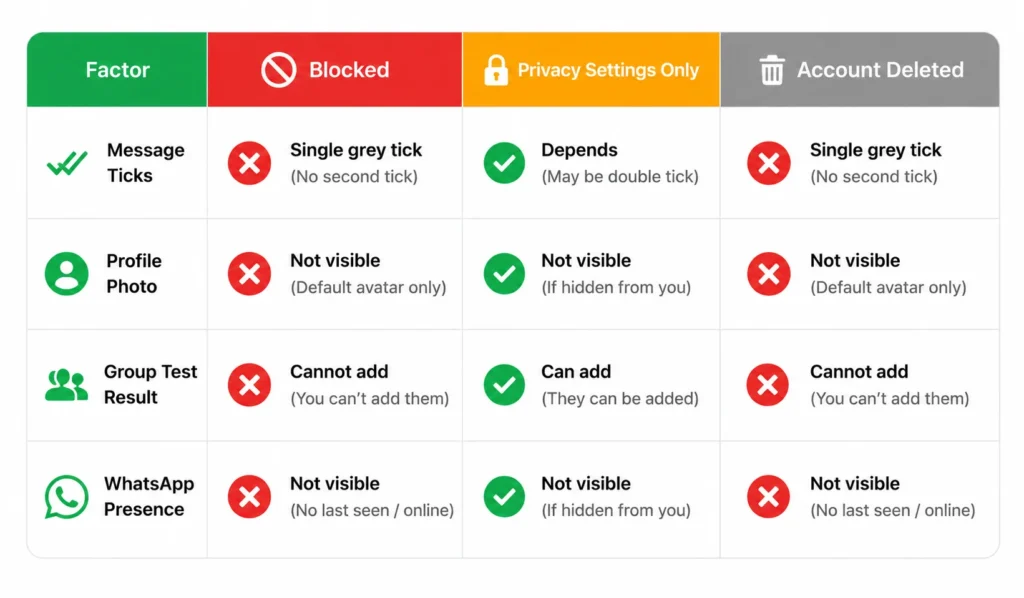
The deleted whatsapp account signs are the hardest to spot because account deletion is relatively rare. Most people who stop using WhatsApp just stop opening it. They don’t go through the process of fully deleting their account. But when it does happen, the lack of any WhatsApp presence when you search the number is the clearest indicator.
Understanding the whatsapp block vs unfriend distinction also helps here. Unlike social media platforms where unfriending someone makes them disappear entirely, blocking on WhatsApp is a one-way restriction. The person is still in your contact list. The chat is still visible. You’re just cut off from interacting with them.
If you’re trying to figure out which scenario applies to you, run the group test. That single action will tell you whether an active block exists. If the group test fails, you’re blocked. If it succeeds but you still can’t see their profile details, it’s privacy settings. If the number shows no WhatsApp account at all, the account was likely deleted.
What If a Client Blocked Your WhatsApp Business Number?
If you’re using WhatsApp Business and a client has blocked you, the signs are identical to regular WhatsApp — one grey tick, missing profile photo, failed calls, and rejection from group or broadcast list additions. The only real difference is the stakes: in a business context, losing communication with a client mid-transaction can have real consequences.
When a client blocks your WhatsApp Business number, your messages to them will stay stuck on one grey tick. You won’t see delivery receipts. You won’t see read receipts. Your calls won’t connect. And if you try adding them to a broadcast list or group, the system will reject them.
I’ve talked to small business owners who panicked when they realized a client blocked them, especially if it was a paying customer or someone in the middle of a transaction. It’s stressful because WhatsApp Business is often the primary communication channel for customer service, order updates, and support.
Here’s how to know if someone blocked you on WhatsApp Business: use the same group creation test I described earlier. Create a test group, try adding the client’s number, and check if they appear in the participant list. If they don’t, the block is confirmed.
The whatsapp message not delivered status on a business account has real consequences. If you’re trying to send order confirmations, appointment reminders, or customer support responses and none of them are getting through, you’re essentially cut off from that client.
So what should you do if a client blocks your business number?
First, respect the block. Don’t try to reach them from a different number or create a new WhatsApp account to bypass it. That behavior crosses a line and can damage your business reputation. If a client blocked you, there’s usually a reason, and pushing harder will only make it worse.
Second, check if there’s an alternative way to contact them. Do you have their email? Did they provide a secondary phone number? Can you reach them through your website’s contact form or a social media account? If the matter is genuinely urgent, like a pending order or a refund issue, try one polite message through an alternative channel explaining that you noticed communication issues on WhatsApp and asking if there’s a better way to reach them.
Third, review what might have led to the block. Were you sending too many promotional messages? Did a customer service interaction go poorly? Was there a misunderstanding? Learning from the situation helps you avoid similar blocks in the future.
And finally, don’t take it personally. Sometimes clients block business numbers simply because they’re overwhelmed with messages or they finished their transaction and don’t want ongoing contact. It’s not always about something you did wrong.
The message delivery status on WhatsApp Business is critical for operations, so losing access to a client is frustrating. But pushing against a block never works. Respect the boundary, find alternative contact methods if absolutely necessary, and move forward professionally.
If You’ve Been Blocked — Here’s What to Do (and What Not to Do)
Finding out you’ve been blocked hurts — there’s no way around that. Whether it’s a friend, a family member, or someone you were close to, it stings.
But how you respond to that discovery matters a lot. Here’s what I’ve learned about handling this situation with dignity.
First, let’s talk about what you should do.
Respect the decision. If someone blocked you, they made a clear choice about boundaries. They’re telling you, in the most direct way WhatsApp allows, that they don’t want to communicate with you right now. Honoring that boundary is the right thing to do, even if it hurts.
If the block seems sudden or confusing and you genuinely believe it might have been accidental, you can try reaching out through one other method, like a brief text message or email, asking if everything is okay. Keep it simple and non-confrontational. Something like, “Hey, I noticed we’re not connected on WhatsApp anymore. If I did something to upset you, I’d like to understand. If you need space, I respect that.” Then leave it alone.
If there’s a legitimate emergency or something time-sensitive that genuinely requires their attention, like returning their belongings or finalizing shared responsibilities, you can try one polite message through another platform. But make sure it’s truly important, not just an excuse to reach them.
And if you’re feeling hurt or confused, talk to someone else about it. A friend, a family member, a therapist. Processing your feelings with someone who isn’t involved helps you gain perspective without making impulsive decisions.
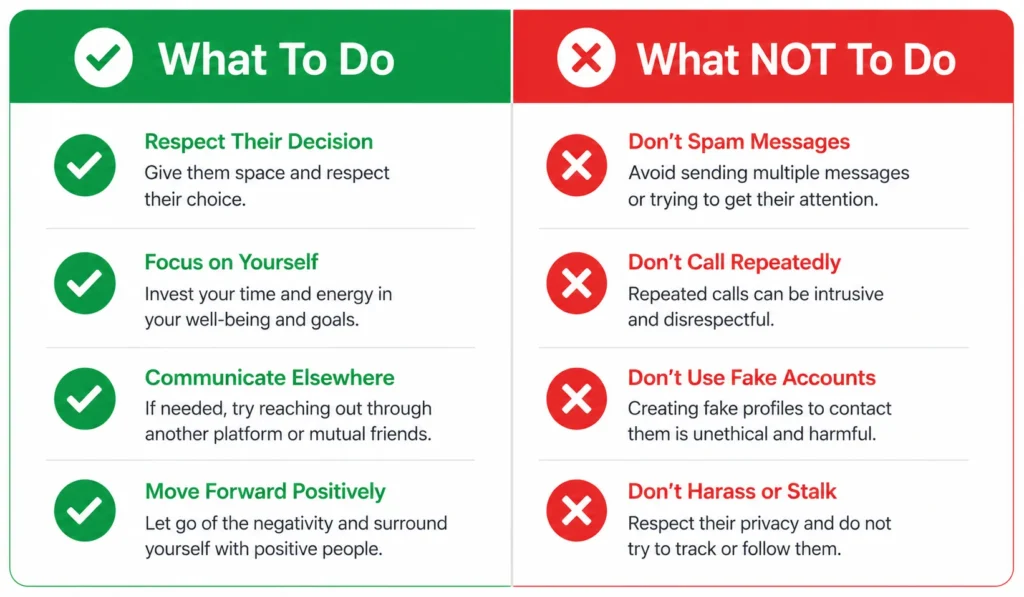
Now let’s talk about what you absolutely should not do.
Don’t create a new phone number or WhatsApp account to try messaging them. This is the digital equivalent of showing up at someone’s house after they’ve asked you not to. It’s invasive, it’s disrespectful, and it will only make the situation worse.
Don’t use third-party apps or services that claim they can bypass WhatsApp blocks or show you if someone blocked you. These apps are scams, they violate WhatsApp’s terms of service, and they often compromise your account security. If you are concerned about your own WhatsApp privacy instead, a better use of your time is learning how to lock apps on Android so your own conversations stay protected.
Don’t spam them on other platforms. If someone blocked you on WhatsApp and you start flooding their Instagram DMs, their Facebook messages, or their email inbox, you’re crossing a line. One polite message on an alternative platform is reasonable if there’s a genuine reason. Persistent contact after being blocked is harassment.
Don’t obsess over the question “Can a blocked person see your messages on WhatsApp?” The answer is no. Once you’re blocked, nothing you send reaches them. Your messages sit on your screen with one grey tick, but they never arrive on the other side. Sending more messages won’t change that.
And don’t keep checking their profile or running the group test repeatedly hoping the block will magically disappear. It won’t. Constantly checking only keeps you stuck in a painful loop.
Here’s something practical: if you’ve ever accidentally blocked someone yourself and want to reverse it, the process is simple. Open WhatsApp, go to Settings, tap Privacy, then tap Blocked Contacts. You’ll see a list of everyone you’ve blocked. Tap on the name you want to unblock and select “Unblock.” That’s how to unblock on WhatsApp, and the person will be able to message you again immediately.
But if you’re the one who was blocked, you can’t force an unblock. That decision is entirely in the other person’s hands.
WhatsApp read receipts don’t apply when you’re blocked because your messages never get delivered in the first place. The read receipt system only activates when a message successfully reaches the recipient’s phone and they open it. With a block in place, that never happens.
The healthiest thing you can do after confirming a block is accept it and move forward. Give the person space. Focus on the relationships in your life that are open and healthy. And if the block was the result of a conflict, give yourself time to reflect on what happened and what you can learn from it.
Blocking is a boundary, not a weapon. Sometimes people block others because they need emotional space. Sometimes it’s because of a misunderstanding that might get resolved later. Sometimes it’s permanent. You don’t always get closure, and that’s hard, but it’s part of life.
Respect the boundary. Take care of yourself. And don’t let one blocked contact consume your peace of mind.
Quick Recap: How to Know If Someone Blocked You on WhatsApp
Here’s everything you need to know about how to tell if someone blocked you on WhatsApp — condensed into the key points that actually matter.
The signs someone blocked you on WhatsApp include a blank or frozen profile picture, a missing last seen and online status, messages that stay stuck on one grey tick, calls that never connect, disappeared status updates, and an inability to add the contact to a group. Their name stays in your chat list, but all interaction is blocked.
But here’s the critical point: these signs alone are not proof. They can all happen for innocent reasons like privacy settings, a turned-off phone, no internet connection, or someone temporarily deleting WhatsApp.
The only way to confirm if blocked on WhatsApp with 100% certainty is the group creation test. Create a new group, try adding the contact along with a known active contact as a control, and check the participant list. If the suspected contact is missing from the list even though you selected them, you’re blocked. If they appear successfully, you’re not.
This test is completely silent. The person never receives a notification. There’s no trace of it. You can check privately without alerting anyone.
If you discover you’re blocked, respect the boundary. Don’t try to bypass it with new numbers or third-party apps. Don’t spam other platforms. Give the person space and focus on moving forward.
And if you’re unsure whether someone blocked you, deleted their account, or just changed their privacy settings, run the group test. That single action cuts through all the confusion and gives you a definitive answer.
WhatsApp designed blocking to be private and dignified. The system protects both people involved by keeping everything silent. Understanding how it works helps you avoid misreading situations, jumping to conclusions, or making things worse by reacting impulsively.
Now you know exactly how to tell if someone blocked you, how to confirm it, and how to handle it maturely. Use this knowledge to stop guessing and start responding to situations clearly — including knowing when to step back and give someone space.
Frequently Asked Questions:
Does WhatsApp notify you when someone blocks you?
No, WhatsApp does not send any notification when someone blocks you. This is intentional to protect user privacy on both sides. The only way to know if you’re blocked is by noticing the warning signs and running the group creation test I described earlier.
Why does my WhatsApp message only show one tick?
One tick means your message reached WhatsApp’s servers but was not delivered to the recipient’s device. When you’re blocked, the server is prevented from forwarding your message to the other person’s phone. However, a single tick also appears when the person has no internet connection, their phone is turned off, or they temporarily deleted the app, so one tick alone is not proof of a block.
Will the person know I tried to add them to a group to check if I’m blocked?
No, the person will not know. WhatsApp silently rejects blocked users from group additions without sending any notification to either party. No record of your attempt appears on their end. The group test is completely private and leaves no trace, which is why it’s the safest way to confirm a block.
What’s the difference between being blocked and the person deleting their WhatsApp account?
Both scenarios show nearly identical signs like a single tick, missing profile photo, and no last seen status. The key difference is that a deleted account shows no WhatsApp presence when you search the number fresh or try adding it as a new contact. With an active block, the account still exists and works normally for everyone except you.
How long should messages stay on one tick before I suspect a block?
A single tick for a few hours or even 24 hours is completely normal and often just means the person’s phone is off or they have no internet. After 48 hours with no change, combined with other signs like a missing profile photo and failed calls, it becomes more significant. But the group creation test is still the only reliable way to confirm a block with certainty.