What Is Background App Refresh? (iPhone & Android Explained)
Quick Answer: What Background App Refresh Does
So what is background app refresh, really? In simple terms, it’s the setting on your phone that lets apps quietly update themselves in the background, even when you’re not actively using them. Picture an assistant who keeps working quietly even after you’ve stopped watching.While you’re scrolling through something else or your phone is just sitting in your pocket, your apps are checking in behind the scenes for new messages, weather updates, or fresh content.
Is it something to worry about? Not really. Background app refresh is a normal part of how your phone works, and for most people, the convenience is worth the small trade off in battery and data.
What Is Background App Refresh, Exactly?
Background app refresh is a feature built into your phone that lets apps stay updated without you having to open them first. It’s a bit like having a helper who keeps checking in on your behalf, even after you’ve walked away. Even when you close an app and move on to something else, that app can still tap you on the shoulder and say give me a second to check for anything new.
Here’s what that looks like in real life. Say you have a weather app sitting quietly on your home screen. Instead of waiting for you to open it and then loading the current forecast, background app refresh lets it check for updates every so often on its own. By the time you actually open the app, the forecast is already sitting there waiting for you.
The same thing happens with something like an email app. Rather than making you open it and wait for new messages to load, the app quietly checks in the background and pulls in anything new before you even tap on it.
This is really what background app activity is all about. Your phone is running small background processes for the apps you use most, so the information feels instant the moment you need it. You are not manually refreshing anything. The app has already done that work for you, which is why everything feels so up to date and ready to go the second you open it.
How It Works on iPhone vs. Android
The way background app refresh works actually depends heavily on which phone you are using. iPhone and Android take two very different approaches to this same idea, and once you understand the difference, managing it becomes a lot easier.
On iPhone (iOS)
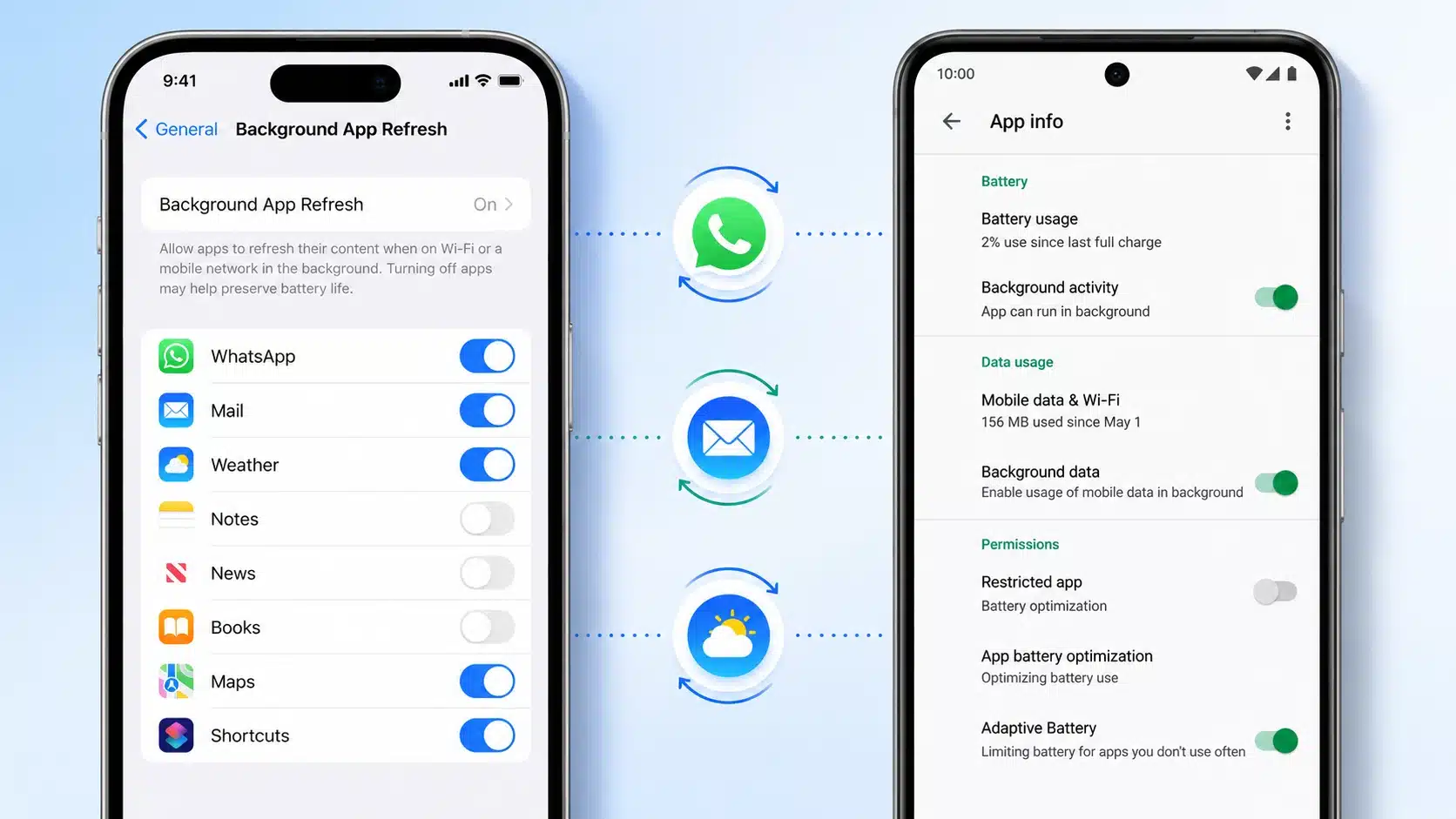
On an iPhone, background app refresh iPhone settings all live inside one single, central menu. Apple built it this way to keep things simple. You go into your iOS settings, tap General, then tap Background App Refresh, and you land on one master screen that controls the whole feature.
From there, you get a top level choice. You can allow apps to refresh using Wi-Fi and cellular data, restrict it to Wi-Fi only, or turn the entire feature off. Below that master toggle sits a full list of every app on your iPhone, each with its own individual switch. This gives you one place to manage everything at once, then fine tune it app by app if you want more control.
On Android
Android handles this in a completely different way. There is no single master switch sitting in one menu. Instead, background app refresh Android settings live inside each individual app’s settings, which means you manage things one app at a time.
Here’s how that works in practice. Say you want to adjust background activity for Facebook. You would go into your Android settings, open the Apps section, and select Facebook specifically. Inside there, you get two separate layers of control.
The first layer is Battery, where you choose between Unrestricted, Optimized, or Restricted. The second layer is Mobile Data, where you can toggle background data on or off separately. Since there is no global switch, you repeat this same process for every app you actually want to adjust.
What Is Background App Refresh Doing to Your Battery and Data?
Background app refresh trades a small amount of battery life and mobile data usage for the convenience of always having fresh content ready to go. That trade off is worth understanding, because it explains why your battery percentage can drop faster than you expect even when you feel like you barely touched your phone.
Here is what is actually happening. Every time an app wakes up to check for something new, it has to reach out and talk to a server somewhere. That little handshake takes processing power, and processing power comes straight out of your battery. Do that across a dozen apps, all refreshing throughout the day, and it adds up.
This is exactly why background app refresh battery drain is such a common complaint. If you have ever wondered why your phone feels warm or loses charge faster than it used to, there is a good chance several apps are quietly refreshing in the background more often than you realize.
The same idea applies to background app refresh data usage, which is really just data sync happening quietly in the background. When an app pulls new content while running in the background, it is using cellular data to do that, even if you never opened the app yourself. If you are on a limited data plan, this can eat into your allowance without you noticing.
There’s nothing wrong with your phone here—Apple explains that this is simply how the feature balances convenience with battery life. It’s just the cost of keeping your apps ready and updated at all times, and knowing where that cost comes from puts you in a much better position to manage it.
Should You Turn It Off? The Real Pros and Cons
Should I turn off background app refresh? My honest answer is that it depends on how you use your phone day to day. Rather than a simple yes or no, it helps to weigh the pros and cons of background app refresh against your own habits.
Pros
The biggest advantage is that your apps feel instant. Because content is already loaded through real time updates, you are not sitting there waiting for things to load every time you open an app.
This also means better app performance overall. Your messaging apps, email, and social media all feel snappier because they have already done the work of checking for anything new before you even tapped on them.
Cons
The obvious trade off is battery drain. All those apps quietly checking in throughout the day do add up, and you will notice it most if you are already running low on charge.
Mobile data usage is the other real cost.Mobile data usage is the other real cost. If you want even more control over which apps access your data, learning how to lock apps on Android gives you an extra layer of privacy and management.
One thing I’ve learned the hard way: If you rely on calling or messaging apps for anything urgent, turning background app refresh off completely can cause a real notification delay, since those apps need to stay active to alert you the moment something comes in. A better approach is keeping it on at home where you are near a charger, then switching it off while traveling or during a long day out when battery matters more than instant updates.
Is Background App Refresh Actually a Problem, or Just Normal?
In most cases, background app refresh running quietly on your phone is completely normal and nothing to be concerned about. It is doing exactly what it is designed to do. That said, there are a few specific signs that tell you when something has actually gone wrong rather than just being the usual background activity.
These are the signs I personally watch for. If an app starts crashing repeatedly, that is a signal worth paying attention to, since normal background app refresh should never cause a crash on its own. Unusually high CPU or RAM use is another warning sign, especially if one specific app seems to be working much harder than it should be. The same goes for a noticeable network slowdown that only shows up when certain apps are running in the background.
If you notice any of these, the quickest fix does not require digging through settings at all. Just open your app switcher for quick app switching, the multitasking view where you see all your open apps lined up, and swipe the problem app away. This force stops it completely, immediately ending its background cycle.
Doing this will not break anything. Reopening the app afterward brings it right back to normal, and in most cases, app performance improves right away once the misbehaving app has been fully closed out.
How to Turn Background App Refresh On or Off
The quickest way to turn off background app refresh or enable background app refresh again is through your phone’s settings, and the exact steps depend on whether you have an iPhone or an Android device.
On iPhone
Open the Settings app on your iPhone or iPad, then tap General, followed by Background App Refresh. This is the same background refresh toggle mentioned earlier, and it gives you three choices right at the top.
Instead of leaving it set to Wi-Fi and Cellular Data, I recommend switching to WiFi refresh only, sometimes labeled background refresh WiFi only in your settings. This one change protects your mobile data by only allowing apps to refresh when you are connected to Wi-Fi, and it still lets everything work normally once you are home or somewhere with a network.
Below that setting, you will see every app listed individually.Scroll through and disable background refresh for anything you rarely open. If you want to go further and remove apps from your phone completely, that frees up storage and cuts background activity entirely.
If you spot an app you have not used in months, it is worth simply deleting it instead of just toggling it off, since that frees up space along with cutting off the background activity completely.
On Android
Since Android does not have one central switch, you will need to handle this through your Android settings on an app by app basis. Open Settings, tap Apps, then select the specific app you want to adjust.
From there, look for the Battery option to manage app refresh permissions, choosing between Unrestricted, Optimized, or Restricted depending on how much background activity you want to allow. Then check the Mobile Data option separately. This is really the answer to how do you stop apps from running in the background, since an app can still use data even when the battery setting allows background activity.
Repeat this for each app you want to fine tune. For even deeper control, you can also remove specific apps entirely from your Android device if you find you’re no longer using them.
Why Is Background App Refresh Greyed Out? And How to Fix It
If your Background App Refresh menu looks greyed out or frozen, it almost always comes down to one of two settings blocking it, and both are simple to fix.
The first and most common cause is Low Power Mode. When your iPhone switches into Low Power Mode, either automatically at a low battery percentage or because you turned it on yourself, the system locks several app refresh settings to save power, and Background App Refresh is one of the first things it disables. To fix this, go to Settings, tap Battery, and turn Low Power Mode off. Head back to General and Background App Refresh, and the menu should be fully clickable again.
If Low Power Mode is already off and the setting is still greyed out, the second cause is usually a restriction sitting inside Screen Time. Open Settings, tap Screen Time, then Content and Privacy Restrictions. Scroll down to the Allow Changes section and look for Background App Activities. You may need to enter your Screen Time passcode here. Switch it from Don’t Allow to Allow, then go back and check General and Background App Refresh again.
In most cases, one of these two fixes solves it right away. If the setting still does not seem to update after making these changes, a quick restart of your phone usually forces everything to refresh properly, and the menu should be fully editable from there.
Background App Refresh for WhatsApp, Facebook, and Other Specific Apps
Not every app needs background app refresh treated the same way. Once you know what is background app refresh doing for different types of apps, a few specific ones are worth calling out on their own.
Background app refresh WhatsApp is one I would strongly recommend keeping on. If you’re also looking to customize your messaging experience, check out how to change your WhatsApp keyboard on Android for faster typing.
WhatsApp relies on staying active in the background to deliver push notifications for messages and calls the moment they arrive. Turning this off means you will only see new messages once you manually open the app, which defeats the purpose of instant messaging in the first place.
Background app refresh Facebook works a little differently, since Facebook is more about scrolling content than urgent alerts. If you’ve ever seen the message ‘This content isn’t available right now’ on Facebook, managing background refresh can sometimes help with loading issues.
The general rule I follow is simple. Any app built around real time communication, like WhatsApp, messaging apps, or anything handling calls, benefits from staying on. Apps built more around browsing or entertainment, like social feeds or games, are usually safe to turn off without losing anything you would actually miss.
FAQs
Is Background App Refresh bad for my phone?
No, it is a normal and safe feature built into your phone. It is only worth checking further if you notice real symptoms like app crashes or unusually high CPU or network use.
Why is my Background App Refresh setting greyed out?
This is almost always caused by Low Power Mode or a Screen Time restriction. Turn off Low Power Mode first, then check Content and Privacy Restrictions under Screen Time if it is still locked.
Does turning off Background App Refresh actually save much battery?
Yes, especially for apps you rarely open. For apps you use constantly throughout the day, the battery savings are much smaller.
Should I turn off Background App Refresh for WhatsApp?
I would keep it on if you want instant message and call alerts. Only turn it off if you do not mind a delay before new messages show up.
What happens if I turn off Background App Refresh completely?
Apps take longer to load fresh content since they only update when opened. Messaging and calling apps in particular may delay urgent notifications.
What is background app refresh in simple terms?
Background app refresh is a feature that lets your apps update their content automatically in the background, even when you’re not using them, so everything feels instant when you open an app.